Dashboard summary cards and limits
Audience: All users | Category: Using the portal
The Dashboard (menu → Dashboard, or the logo) shows six summary cards at the top of the page, and the full list of your deposit transactions below that. The totals does include deposit requests created in your company's time zone.
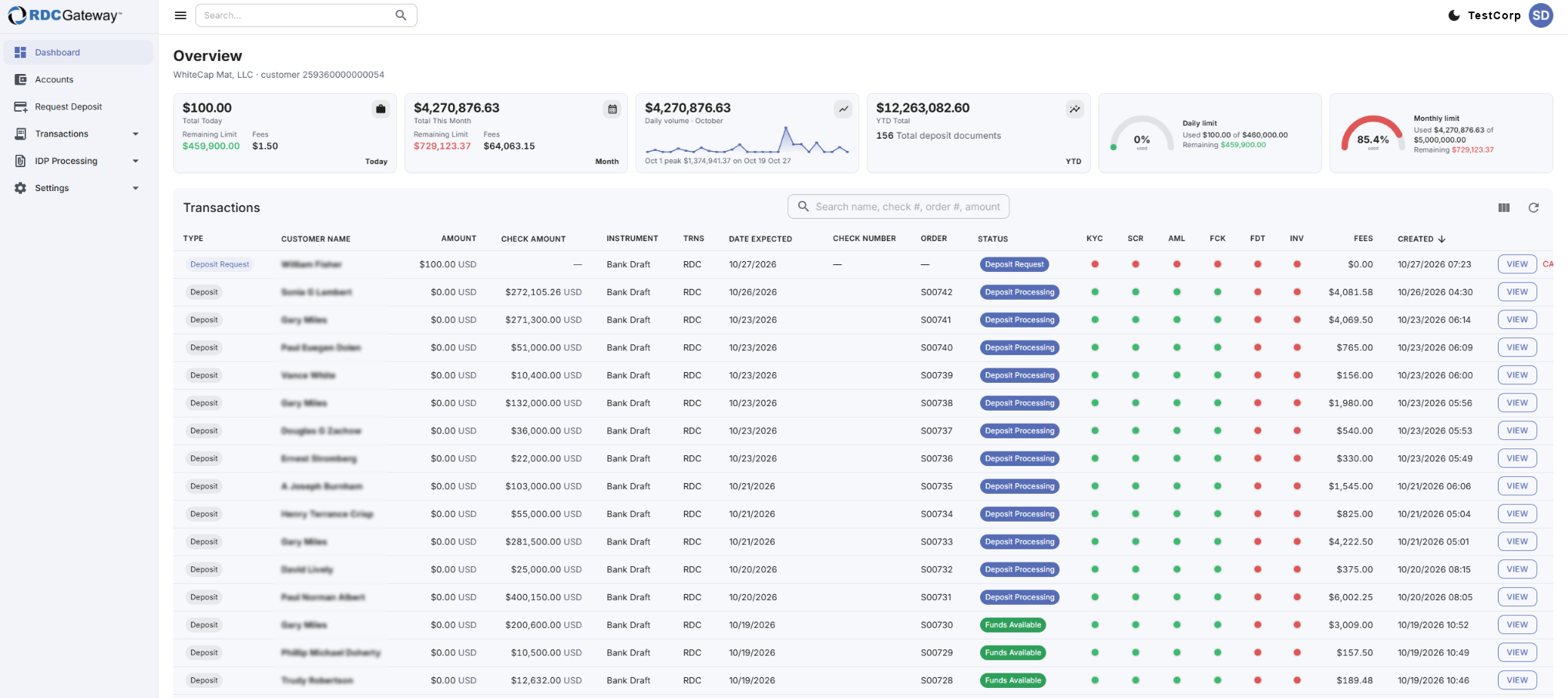
The six cards
| Card | What it shows |
|---|---|
| Today | Total requested today, the daily limit remaining, and today's fees. |
| Month | Total since the 1st of the month, monthly limit remaining, and fees this month. |
| Volume | Area chart of deposit value per day for the current month. Hover a point for that day's total and number of items. |
| YTD | Total value and number of deposit documents since 1 January. |
| Daily limit | A half-ring gauge of how much of today's amount is used, the daily limit and the remainder. |
| Monthly limit | The same gauge as above, but for the month. |
Gauge colors
- Green: under 25% used
- Blue: under 50% used
- Gold: under 75% used
- Red: above 75% used
Limits warning
If no limits have been set for your company yet, a warning appears under the cards and the remaining-limit figures are not meaningful. Contact Flint.
Related articles
- Transactions List
- Troubleshooting: Dashboards & Accounts
- Company Account
Was this article helpful?
That’s Great!
Thank you for your feedback
Sorry! We couldn't be helpful
Thank you for your feedback
Feedback sent
We appreciate your effort and will try to fix the article