Requesting a Deposit
Audience: Admins and Operators | Category: Deposits
Use Request Deposit to tell Flint a check is on its way. The request is reviewed before the check is accepted.
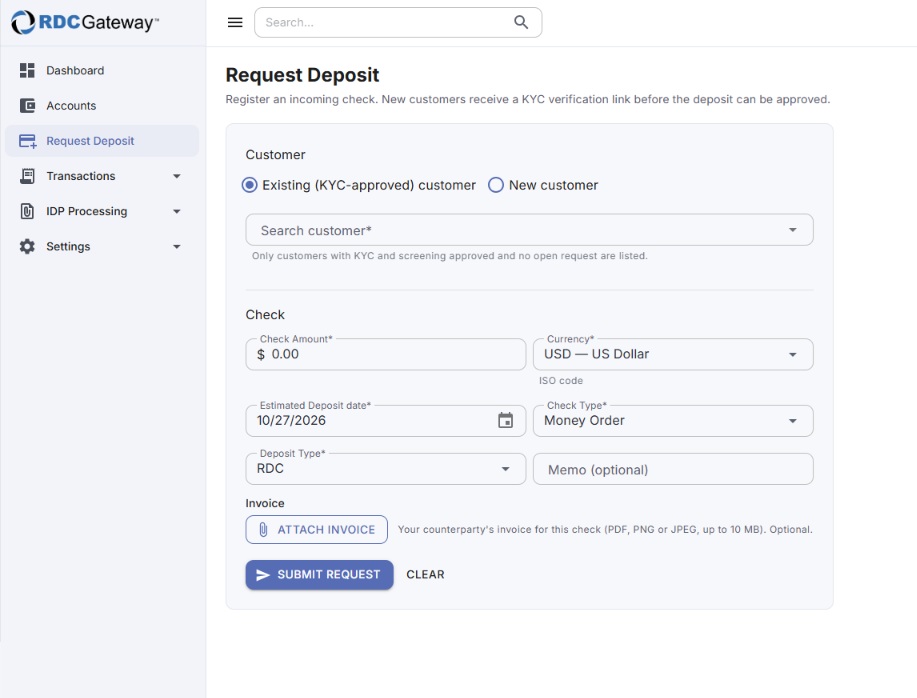
Steps
- Customer. Choose Existing (KYC-approved) customer and start typing the name. Only people who have passed identity verification and screening, and have no other open request, are listed. For a first-time payer choose New customer and enter first name, last name and email.
- Check amount and Currency (USD or CAD).
- Estimated deposit date: defaults to today.
- Check type: Personal, Business, Payroll, Government issued, Money Order, Cashier's, Bank Draft, Travelers or Other. Types your Admin has disabled under Settings → Instruments are not offered.
- Deposit type: how the check will reach Flint: RDC (scanned), Lockbox, Hand or Electronic.
- Memo (optional, up to 255 characters).
- Invoice (optional). Choose Attach invoice to add the payor's invoice as PDF, PNG or JPEG up to 10 MB. It shows as a green INV dot on the transaction list and can be opened by you and by Flint's reviewers.
- Choose Submit request. Clear empties the form.
Related articles
- KYC Verification Links
- Instruments
- Troubleshooting: Deposit Requests
Was this article helpful?
That’s Great!
Thank you for your feedback
Sorry! We couldn't be helpful
Thank you for your feedback
Feedback sent
We appreciate your effort and will try to fix the article