Connections: bank, SFTP, transmission and format
Audience: Admins | Category: Settings
Connections define how your deposits reach the bank. Most companies only need the first item.
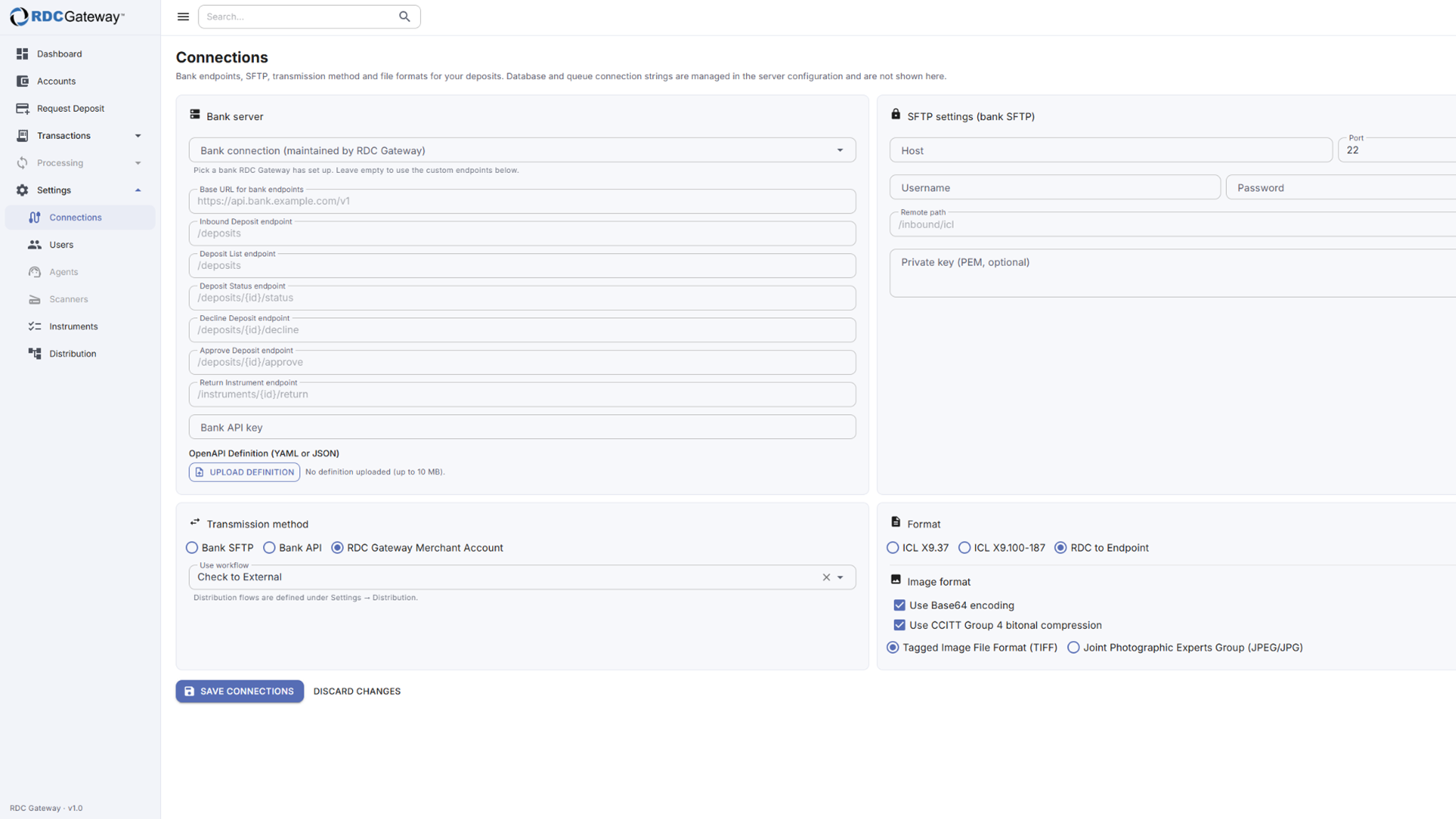
Options
- Bank connection: pick a bank that Flint has already set up (API or SFTP). Leave it empty only if you use custom endpoints.
- Bank server: custom base URL, receiving/status/list endpoints and API key. Stored secrets show as "stored — enter to replace"; leave the field blank to keep the current one.
- SFTP settings: host, port, username, password or private key, and remote path.
- Transmission method: Bank SFTP, Bank API or RDC Gateway Merchant Account, plus the distribution flow to use (Use workflow).
- Format: ICL X9.37, ICL X9.100-187, FDX to Endpoint or RDC to Endpoint, and the image settings (Base64, CCITT Group 4, TIFF or JPEG). CCITT compression applies to TIFF only.
Save
Choose Save connections when done, or Discard changes to reload.
Related articles
- Distribution Flows
- Settings Overview
Was this article helpful?
That’s Great!
Thank you for your feedback
Sorry! We couldn't be helpful
Thank you for your feedback
Feedback sent
We appreciate your effort and will try to fix the article